Baldur's Gate 3: Beginner's Guide and Best PC Settings
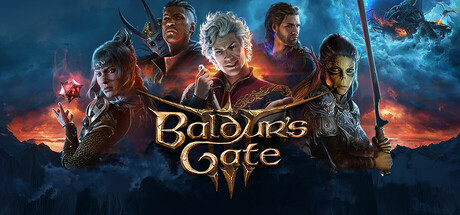
How to start Baldur's Gate 3 well: picking a character, exploring vertical maps, early combat habits, saves and co-op, PC settings for each hardware tier, and where trainer options fit.
Creating Your Character
Character creation offers three routes. A custom character draws on 12 classes and 11 races from the D&D Player's Handbook. An Origin hero comes with a hand-crafted background, a set personality and goals that tie into the main plot. The Dark Urge sits between the two: you customise it like your own character, but it has its own mechanics and storyline. Custom gives you the most freedom, while an Origin gives you the most written material about who you are.
D&D players will recognise the class and race names and can build around a favourite concept. Newcomers should pick a role they can play without second-guessing, such as a sturdy front-liner or a ranged character who hangs back. Your build does not need to be perfect on the first evening. The rest of the party covers what one character lacks.
The Dark Urge layers a second story on top of the main one, and plenty of players prefer to see the base narrative first. That is a matter of taste, not a rule. Between seven Origin heroes, adjustable difficulty and choices that change outcomes, the game is designed for repeat runs, so treat your first character as a way to learn rather than a permanent commitment.
- For a first run, pick a class whose job you can describe in one sentence.
- Settle on a clear concept before you start; it makes early choices much easier.
- Keep the Dark Urge or another Origin in reserve for a second playthrough.
Exploring the Forgotten Realms
Baldur's Gate 3 is built vertically. You can sneak, dip, shove, climb and jump, and ledges, rooftops and lower levels often hold routes and secrets that the obvious path skips. That holds from the shadow-cursed forests to the Underdark caverns and the city of Baldur's Gate itself, so check each area from more than one height before moving on.
Your choices drive the story. A mind flayer parasite sits in your brain, and you can resist the powers it grants or give in to the corruption. Companions react to what you do, and the relationships you build or wreck decide how their personal stories end. Read dialogue properly and accept that one playthrough will not show you everything.
Loot piles up fast, as in most RPGs of this kind. Sort your inventory regularly so it does not stall you halfway through a dungeon. Keep consumables that solve problems, healing above all, and sell or drop the rest. When an area seems to have no way forward, look for another entrance before deciding you are stuck.
- Look up and down in every new area; height often hides loot or another route.
- Sneak ahead to scout a room before you commit the whole party.
- Talk to companions between major events to keep up with their stories.
- Clear out inventory clutter little and often rather than all at once.
Combat and Party Basics
Fights reward planning over reflexes, and the game is listed as playable without timed input, so each decision can take as long as you need. Positioning matters as much as in any tactical RPG: keep fragile characters behind sturdier ones, spread out against enemies that hit groups and use the terrain. Shove is part of the movement toolkit, and near a ledge it is worth trying on an enemy.
The party is your main resource. Each Origin hero brings their own traits and outlook, and a mixed group copes with more situations than four similar characters. Check what everyone can do before a big fight. Spell slots run out, so hold your strongest options for fights that need them rather than spending them on the first enemy in sight.
Difficulty is adjustable. When a fight keeps going badly, change the approach first: start from a different position, open from stealth or focus a different target. If you mainly want the story, dropping the difficulty is a reasonable call. Losing once to a mechanic you had not seen is part of learning; losing the same fight ten times means something needs to change.
- Scout with stealth so you choose where a fight starts.
- Position your spellcasters and ranged characters behind the front line.
- Look for ledges and drops where a shove could pay off.
- Lower the difficulty if repeated losses stop being fun.
Saving, Co-op and Multiplayer
You can save at any time, so do it often: before major conversations, before fights that look dangerous and before any decision that feels permanent. Choices carry weight and runs diverge, and a recent save lets you test another outcome without replaying hours. Steam Cloud is supported, so saves can follow you between PCs.
Up to four players can share a campaign through online co-op, LAN co-op or cross-platform multiplayer, and Remote Play Together is listed too. Players can fight side by side or split up to chase their own quests. That freedom is a large part of the appeal, but agree on some ground rules first, especially about major story choices one player could make for the whole group.
Co-op moves more slowly than solo play because conversations and combat turns involve several people. Short, regular sessions with the same group tend to work better than a single marathon. If you play both solo and with friends, keep separate saves for each campaign so neither overwrites the other.
- Save before every major conversation and every fight that looks like a boss.
- Keep separate saves for solo and co-op campaigns.
- Agree with your group on how to handle big story decisions.
- Split the party in co-op to cover more ground, then regroup for fights.
PC Settings and Performance
Minimum spec is Windows 10 64-bit, an Intel i5 4690, AMD FX 8350 or Snapdragon X Elite, 8 GB of RAM, and a GTX 970, RX 480, Intel Arc A380 or Qualcomm Adreno X1 with at least 4 GB of VRAM, plus DirectX 11. Both tiers ask for 150 GB of storage and state that an SSD is required. Install on an SSD: a hard drive falls outside the published requirements, and you should expect longer loads if you try one.
On a minimum-spec PC, start at 1080p with lower settings and raise them from there. In most modern 3D games, shadows, volumetric effects and texture quality are the heaviest options. With a 4 GB card, textures are the setting to watch, so keep them at a level that fits in video memory. With 8 GB of system RAM, close browsers and other background apps before you launch.
The recommended tier is an Intel i7 8700K or AMD Ryzen 5 3600, 16 GB of RAM, and an RTX 2060 Super, RX 5700 XT or Arc A580 with 8 GB or more of VRAM. Hardware at that level leaves more room to raise settings. For accessibility, the game offers adjustable text size, camera comfort options, color alternatives, subtitle options, custom volume controls and full controller support, including DualShock and DualSense pads.
- Install on an SSD with at least 150 GB free.
- On 4 GB graphics cards, lower texture quality first, then shadows.
- Close background programs if you have 8 GB of RAM.
- Set camera comfort and text size early if you need them.
How the Trainer Options Fit
The trainer options line up with the game's main pressure points. Infinite Health and One-Hit Kills suit players who want the story without hard fights. Unlimited Spell Slots and Unlimited Actions let you experiment with spellcasters and combinations without rationing. Infinite Movement and Super Speed make large, vertical areas quicker to cover, and Game Speed shortens slow stretches. Unlimited Gold, Unlimited Items and Infinite Carry Weight take money and inventory management out of the picture.
XP Multiplier, Max Level and Unlimited Ability Points are build-testing tools. With 12 classes and 11 races to choose from, you can try a concept at full strength before committing to it in a normal run. If you still want the game to push back, use them sparingly: switch an option on for one specific frustration, then off again.
Keep the trainer to single-player, offline sessions. The game has online, LAN and cross-platform co-op, and a trainer does not belong in a shared session, where it can affect other players and cause problems. Before you start, copy your save files to a folder outside the game's directory. Steam Cloud syncs saves, so a separate manual copy is your fallback if something goes wrong. A dedicated save for trainer play is also worth setting up.
- Use the trainer only in solo, offline sessions, never in co-op.
- Copy your saves to a separate folder before enabling any option.
- Keep a dedicated save file for trainer experiments.
- Use Max Level and Unlimited Ability Points to test a build before a real run.
- Switch options off when you want the normal challenge back.
FAQ
How many classes and races can I choose from in Baldur's Gate 3?
There are 12 classes and 11 races from the D&D Player's Handbook. You can also play one of the Origin heroes or the Dark Urge, a customisable Origin with its own mechanics and story.
Can I play Baldur's Gate 3 with friends?
Yes. A party of up to four can play through online co-op, LAN co-op or cross-platform multiplayer, and players can split up to follow their own quests.
Do I really need an SSD for Baldur's Gate 3?
Yes. Both the minimum and recommended requirements state that an SSD is required, with 150 GB of free space.
Can I use the trainer in co-op?
No. Use trainer options only in single-player, offline play, and back up your saves before enabling anything.
Is Baldur's Gate 3 playable with a controller?
Yes. It has full controller support, including DualShock and DualSense controllers.
Comments
No comments yet
Be the first to share your thoughts.