American Truck Simulator: Beginner's Guide and Best Settings
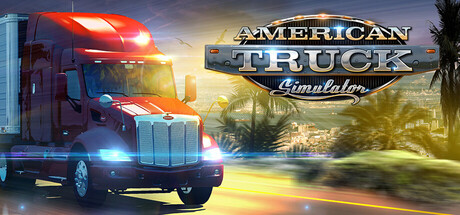
How to get from hired driver to company owner in American Truck Simulator, stay clear of fines and weigh-scale trouble, tune the game for your PC and use trainer options without wrecking your saves.
Your First Hours on the Road
Everyone starts as a driver for hire on the local freight market, hauling jobs with a truck and trailer that belong to someone else. That makes the opening hours the cheapest time to learn, because mistakes cost less now than they will later. The long-term route is laid out for you: earn money and experience, buy a truck and become an owner-operator, then build a company with garages, hired drivers and a fleet. There is no reason to hurry the first purchase. Use those early jobs to learn how a loaded rig brakes, turns and reverses.
Check the settings before the first delivery. Steering wheels, gamepads and keyboard-only play are all supported, though controller support is listed as partial, so gamepad players may find some gaps. Difficulty is adjustable, and the simulation options cover air brakes, a retarder, Jake brake, trailer brake, several transmission types modelled on real trucks, and brake intensity. Newcomers are better off starting with the simplest transmission and lighter simulation settings, then switching on extra realism one option at a time as each becomes second nature.
- Adjust your seat, mirrors and head position before leaving the first depot.
- Bind the retarder or Jake brake to a button you can reach easily.
- The game lets you save anytime, so save before a tricky parking job.
- Follow the route adviser until you know the main highways.
Driving Clean: Fines, Scales and Parking
Patient, legal driving pays. Police fine you for breaking traffic rules and speed limits, and each fine comes straight out of the job's profit. Posted limits matter most as you roll into towns, where it is easy to arrive too fast. Long downhill grades are the other trap: a heavy trailer will push your speed up before you notice. Hold it back with the retarder and Jake brake so the service brakes are fresh for real stops. Gentle driving is also the safest way to keep a load intact.
Weigh scales can pull you in for an overweight check, so know what you are carrying. Most new drivers struggle more with length than weight, though. Trailers run up to 53 feet, and those need wide turns and slow reversing. Take junctions wide and watch the trailer wheels in the mirrors, not the cab. Creep into parking spots. When a reverse goes wrong, pull forward and straighten up rather than fighting a bad angle.
- Brake before curves, not halfway through them.
- Use small steering inputs when reversing a long trailer.
- Check your mirrors for trailer swing at every tight intersection.
- Slow down early when entering towns to avoid speeding fines.
Choosing Cargo and Trailers
Loads range from food to machinery to hazardous goods, carried on reefers, flatbeds, dumpers, lowboys and goosenecks. Destinations include refineries, oil storage, gas stations, car factories and roadworks. Trailer types handle differently, and heavier, longer combinations generally need more stopping distance and softer steering. Short routes with light loads are the sensible choice at first, since they let you finish cleanly while you learn.
Progress comes from safe deliveries and better skills, so raise the difficulty of your jobs gradually. A flatbed or lowboy makes a good next step once standard trailers feel routine. Hold off on hazardous cargo until you can drive a full route without hard braking. The base map covers California, Nevada and Arizona, and learning one state's main highways before branching out means fewer missed exits and less rerouting.
- Start with short, light jobs while you learn the handling.
- Move on to new trailer types one at a time.
- Learn one state's highway network before taking long cross-region runs.
From Owner-Operator to Company Owner
Owning a truck changes how you play. It becomes your home on the road, and you can swap the cabin, chassis, paint job, tuning accessories and engine. Spending everything on a bigger engine and cosmetic parts right away is tempting, but a cash reserve is worth more at this point. Keep enough aside for fines, repairs and the odd bad delivery so one rough job does not leave you stranded. Upgrade the engine when long climbs or heavy loads actually slow you down.
The company side opens up once your own deliveries are reliable. You can buy garages, hire drivers and build a fleet, and the aim is profit. Grow in steps, letting current income pay for each new garage or driver rather than draining your balance. Garages make most sense in areas where you already do plenty of work. A small fleet with money in the bank is easier to run than a large one living hand to mouth, so look at your finances after each expansion before planning the next.
- Keep a cash buffer after every purchase.
- Buy engine upgrades to solve a real problem, not for looks alone.
- Add garages and drivers one step at a time.
PC Settings and Performance
Minimum requirements are Windows 10 64-bit, an Intel Core i5-6400 or AMD Ryzen 3 1200, 8 GB of RAM, and a GeForce GTX 660, Radeon RX 460 or Intel HD 630 with 2 GB of video memory. The recommended spec moves up to an i5-9600 or Ryzen 5 3600, 12 GB of RAM, and a GTX 1660 or RX 590. Both call for 25 GB of storage, and that figure covers the base game only, so leave room for expansions or Workshop mods. An SSD should help with load times.
Near the minimum spec, begin with a modest resolution or resolution scale and raise it gradually. Shadows, view distance, mirror rendering and anti-aliasing tend to be the heaviest options in open-world driving games, so cut those first. Texture quality can stay as high as 2 GB of video memory allows. Heavy traffic and dense cities lean on the processor, which counts on i5-6400 or Ryzen 3 1200 class chips. Frame drops that happen mostly in cities point to a CPU limit rather than the graphics card.
Recommended-level hardware leaves headroom. Put it into view distance and shadows first, since seeing farther down the highway makes braking and lane changes easier to plan. Recent updates have brought the Improved Material System to more truck interiors, so higher settings may also show off the cabin. Wheel users should favour a steady frame rate over peak detail, because stutter makes fine steering and slow reversing harder. Cap the frame rate at a level your PC holds consistently.
- Lower shadows and view distance first on weaker PCs.
- Close background apps if you only have 8 GB of RAM.
- Plan for more than 25 GB if you use DLC or mods.
- Choose a stable frame rate over maximum detail when using a wheel.
Using the Trainer Sensibly
Our trainer includes Unlimited Money, Unlimited Fuel, No Truck Damage, No Cargo Damage, No Fatigue, Freeze Delivery Timer, XP Multiplier, Unlimited Skill Points, No Fines, Freeze Game Clock and Game Speed. Keep it to offline single-player. American Truck Simulator also has multiplayer and online co-op, and the trainer has no place there because it affects other players. Shut it down completely before joining any shared session.
Back up your profile and saves before enabling anything. Saves sync through Steam Cloud, which means a modified save could upload and overwrite your clean copy on other machines. Store a manual backup outside the game folder and think about pausing cloud sync while you experiment. Turn on one option at a time, save, and check the game still behaves normally. For achievements earned the honest way, keep a separate profile that never touches the trainer.
- Single-player and offline only.
- Back up saves before enabling any option.
- Pause Steam Cloud sync while testing changes.
- Keep a separate clean profile for achievements.
Updates, Mods and Extras
SCS Software promises long-term support, and the recent patch notes bear that out. Update 1.62 ran as an open beta before release. It extended the Improved Material System to the interiors of two more trucks and added a Tourist Boards update tied to the Atlas feature from the Road Trip: Ford DLC, which brought Ford cars into the game. After a major update, confirm your mods still work before loading a long-running career save.
- Back up your profile before installing a major update.
- Disable mods after a patch until you know they still work.
- Use the photo mode to record your favorite routes and rigs.
FAQ
Which states are in the base game?
California, Nevada and Arizona. The 25 GB storage requirement applies to the base game alone.
Do I need a steering wheel to play?
No. Wheels are supported, but you can also play with keyboard only, and gamepad support is listed as partial.
Will my PC run American Truck Simulator?
The minimum is Windows 10 64-bit, an Intel Core i5-6400 or Ryzen 3 1200, 8 GB of RAM and a GTX 660, RX 460 or Intel HD 630 with 2 GB of VRAM. For smoother play, the recommended spec is an i5-9600 or Ryzen 5 3600, 12 GB of RAM and a GTX 1660 or RX 590.
Can I use the trainer in multiplayer or co-op?
No. Use it only in offline single-player, and close it completely before joining any multiplayer or online co-op session.
How do I avoid fines?
Obey traffic rules and speed limits, since police fine you for breaking them. Watch your cargo weight too, because you may be checked at weigh scales.
Comments
No comments yet
Be the first to share your thoughts.