It Takes Two: Co-op Beginner's Guide and Best PC Settings
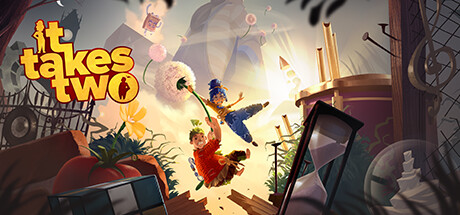
How to set up It Takes Two for two players, play well as Cody and May, tune your PC for split screen, and keep trainer options to offline sessions.
What Kind of Game This Is
It Takes Two is an action adventure from Hazelight Studios, the team behind A Way Out, and it only works with two people. There is no solo mode. One player controls Cody, the other May, a feuding couple turned into dolls by a magic spell, and the story follows their attempt to get back to normal while their relationship frays. Every chapter is designed around both of you acting together, so expect both players to pull their weight.
Platforming is the backbone, but the game rarely sticks with one idea for long. The store page mentions fighting gangster squirrels, piloting a pair of underpants, DJing in a nightclub and bobsledding through a snow globe. Each level also gives Cody and May new abilities built to work in tandem, which means you will keep relearning your tools. Don't expect to master one system and ride it to the credits. Adapting is the skill the game asks for.
- Line up a partner before you start: there is no single-player option.
- Read the ability prompts at the start of each level, since your toolset changes often.
- Pick a partner you can play the whole story with; it is built to be finished as a pair.
Ways to Play Together
Couch co-op runs in shared or split screen on one PC, ideally with two controllers. For online play, the Friend's Pass lets a friend join you without owning the game. Steam Remote Play Together is supported too: it streams your session to a friend's machine so they can play along. Which route makes sense comes down mostly to whether you share a room and how good your connection is.
The October 2026 update added online cross-play between PC, Xbox Series X|S, Xbox One, PlayStation 5, PlayStation 4 and Nintendo Switch 2, so a PC player can now team up with a friend on console. The patch notes tell players to update to the latest version, so check both copies before you try to connect. Even the minimum requirements list a broadband connection, and a stable link matters for any online session.
- Use Friend's Pass if your partner does not own the game.
- Update both copies before attempting a cross-play session.
- With Remote Play Together, the host's upload speed carries the session, so use a wired connection if you can.
- Couch co-op sidesteps network problems entirely if you are in the same room.
Getting Started as Cody and May
Settle early on who plays Cody and who plays May, since their abilities differ. Both characters receive new, linked powers in each level, so the choice comes down to comfort with the controls rather than which one is stronger. If one of you plays less often, give that person a few minutes with basic movement before pushing on. An unhurried first hour makes the rest go more smoothly.
Talk constantly. As in most co-op platformers, plenty of obstacles need one player to set something up while the other moves, and most timing failures are really communication failures. Say what you are about to do, count down before synchronized jumps, and warn your partner before triggering anything that affects their half of the screen. If a section has you stuck, stop and go over what each of your current abilities does. The answer is more likely to come from combining them than from repeating the same attempt.
- Call out your actions before you take them.
- Use a simple countdown for jumps that need matching timing.
- When stuck, go through what both current abilities do and look for a combination.
- Swap who leads a section if one player is getting frustrated.
Playing Well Through the Levels
The constant genre shifts reward patience. Standard platformer habits apply: watch an obstacle once before committing, look for the rhythm in moving hazards, and use the camera to check your landing. In fights, split the work so one player draws attention while the other deals with threats, then swap. Bigger encounters in co-op games tend to go better when you read attack patterns together, so share what you spot rather than each learning alone.
Now and then one player will wait while the other acts. That is normal in a game built for two, and the roles usually flip soon after. When you fail a sequence, treat it as a practice run and talk through what went wrong before retrying. Don't rush the settings either. The range of places the game sends you is a big part of its appeal, and the story plays best at a steady pace.
- Watch one full cycle of a hazard before moving.
- In fights, divide attention and trade roles when needed.
- Let whoever spotted a pattern lead the next attempt.
- Take short breaks between chapters so both players stay sharp.
Controllers and Couch Setup
On PC the game has full controller support, including DualShock and DualSense pads. For couch play, two controllers are far more comfortable than sharing a keyboard. Connect both before launching so they are detected cleanly. If you use Steam's controller configuration, check that each pad is assigned to the right player before the first chapter; a swapped input is easy to miss and confusing once you start moving.
Sit close enough that both halves of the split view are readable. That is rarely a problem on a large TV, but on a monitor a small brightness bump keeps darker areas visible to both players. Stereo and surround sound are supported, which helps you catch audio cues from your partner's side, so speakers or a shared sound system suit couch co-op better than one player in headphones.
- Pair both controllers before launching the game.
- Confirm which pad controls which character in the first few minutes.
- Use speakers rather than headphones for couch sessions.
- Nudge brightness up if dark areas are hard to read in split screen.
PC Settings and Performance
The minimum spec lists an Intel Core i3-2100T or AMD FX 6100, 8 GB of RAM and a GeForce GTX 660 or Radeon R7 260x on DirectX 11. Recommended moves up to a Core i5 3570K or Ryzen 3 1300x, 16 GB of RAM and a GTX 980 or R9 290X. Both tiers need 64-bit Windows 8.1 or 10 and 50 GB of free storage. Split screen draws two views at once, so a PC near the minimum will feel the strain more in couch co-op than online.
Steam's listing does not detail the in-game graphics menu, so this advice follows what generally holds for DirectX 11 games. On weaker PCs, drop resolution or render scale first, then shadows, then ambient occlusion and post-processing, which cost a lot for little visible gain. With 8 GB of RAM, close browsers and other background apps. Hardware at or above the recommended spec should cope with higher settings and still leave room for split screen or for streaming through Remote Play Together.
- Install on an SSD if possible to cut loading times.
- On minimum-spec PCs, lower resolution or render scale before anything else.
- Cut shadows and post-processing next.
- Close background apps if you only have 8 GB of RAM.
- Remote Play Together hosts need spare performance for encoding the stream.
Using the Trainer Responsibly
Because It Takes Two has no single-player mode, trainer use needs extra care. Keep it to local couch co-op on your own PC, offline, and only with your partner's agreement. Leave it off in online sessions, Friend's Pass games, Remote Play Together and cross-play matches, where it changes another person's game and may conflict with online systems. No trainer can guarantee it won't cause trouble with online services. Back up your save files before enabling anything, and remember that Steam Cloud may sync altered saves.
Several options fit this game well. Infinite Health and Instant Respawn take the sting out of mistakes for a less experienced partner. Save Position and Load Position let you rehearse a tricky jump as often as you like, and Freeze Timer and Game Speed help in timed sections. Super Speed, Super Jump and Fly Mode can skip platforming, but in a game built on scripted two-player moments they may bypass triggers and leave you stuck, so use them sparingly. One-Hit Kills, Infinite Ammo and No Reload only matter in combat segments that use those mechanics.
- Copy your save folder somewhere safe before first use.
- Keep the trainer to offline couch co-op.
- Agree with your partner before switching any option on.
- If a scripted event does not trigger, turn off Fly Mode and movement boosts.
- Use Save Position and Load Position for practice, not for skipping whole chapters.
FAQ
Can I play It Takes Two alone?
No. The game is built purely for co-op and always needs a second player, either on the same PC in split screen or online.
Does my friend need to buy the game?
Not necessarily. The Friend's Pass lets a friend join you for free, and Steam Remote Play Together lets a friend play along through a stream of your session.
Does It Takes Two support cross-play?
Yes. An October 2026 update added online cross-play between PC, Xbox Series X|S, Xbox One, PlayStation 5, PlayStation 4 and Nintendo Switch 2. Update to the latest version before connecting.
Will my PC run it?
The minimum is roughly a GTX 660 or R7 260x with 8 GB of RAM; recommended is a GTX 980 or R9 290X with 16 GB. You also need 50 GB of storage and 64-bit Windows 8.1 or 10.
Can I use the trainer when playing online?
No. Use it only in offline local co-op with your partner's agreement, and back up your saves first.
Comments
No comments yet
Be the first to share your thoughts.